
Chore app for couples
A chore app for couples to plan the week’s chores together.
Housli is a chore app for couples. You put each chore on one shared list with a name and a day, and each of you sees your own chores on Today. It works on iPhone and in any browser. You can also set a chore to repeat and pass between you.

Housli is free. All features are included.
By the Housli team · Updated
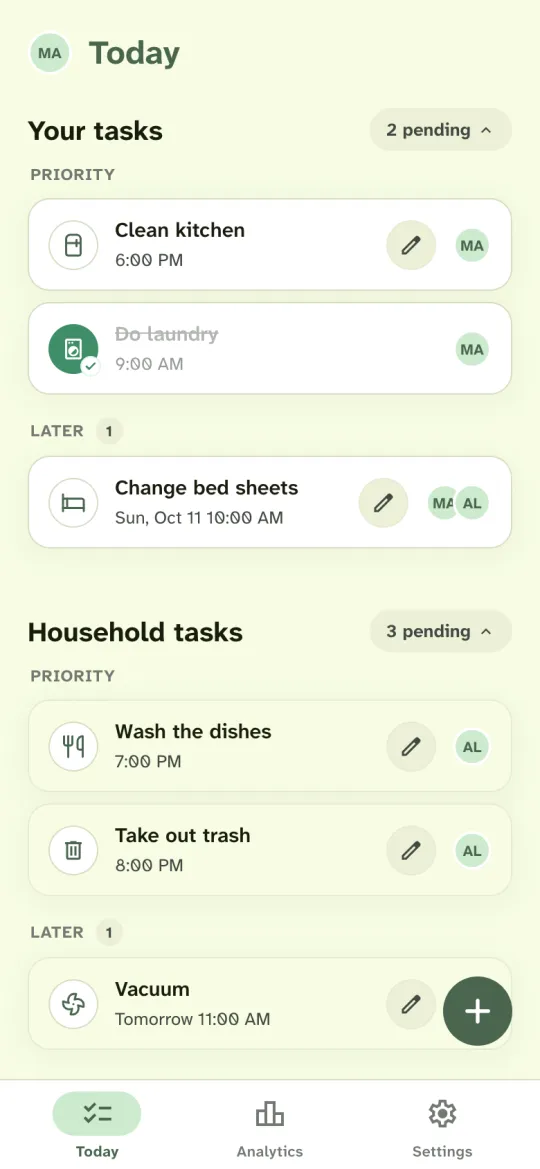
Split a week of chores in four steps.
List what keeps coming up
Think about the last week: dishes after dinner, a load of laundry, trash night, the weekend vacuum. Pick them from Housli’s chore list or type your own.
Give each chore a name and a day
Assign each chore to you, your partner or both of you, and pick the day. Add a time when it matters, such as trash night at 8 PM.
Invite your partner
Send your partner a link. They sign in with their own account and see the household you set up.
Check Today
Today shows your chores at the top and your partner’s below. Chores for the next days wait under Later. Tap a chore when you finish it, and your partner sees it marked done.
A sample chore schedule for two.
Most weekly chores fall into four groups: the kitchen, laundry, the trash and cleaning. The table shows one way a couple can split a week. Change the names, days and chores to suit your home.
| Chore | How often | Who | Day |
|---|---|---|---|
| Wash the dishes | Daily | Take turns | Every evening |
| Clean kitchen | Weekly | Maya | Saturday |
| Do laundry | Weekly | Alex | Sunday |
| Take out trash | Weekly | Alex | Monday |
| Take out recycling | Weekly | Maya | Thursday |
| Clean bathroom | Weekly | Take turns | Friday |
| Vacuum | Weekly | Take turns | Saturday |
| Change bed sheets | Every 2 weeks | Both | Sunday |
Set each chore that comes back as a recurring chore, and turn on Rotate assignees for the ones you take turns with.
How to split chores with your partner
Start with what each of you does already. Give each chore to the person who minds it least, and take turns with the chores neither of you wants. Write down what a chore includes, for example: the kitchen means the counters, the stove and the sink.
Look at the plan again after two weeks. Analytics shows how many chores each of you finished by week, month or year, so you can talk about the split with the same numbers in front of you.
When one of you is busy or away
Plans change. Open a chore on Today and change the person. For a repeating chore, choose Only today to change the person for one day, or From now on for every later day. A new date or time on a repeating chore moves the whole schedule to that date. Your partner sees the change on their Today.
Keep the first list short
Start with the chores that cause the most questions, often the dishes, the trash and the laundry. Add the rest after the first week, when you know how the plan works for the two of you. A short list that both of you check each day is easier to keep up.
Repeat the chores that come back each week.
Set the dishes to repeat every evening or the sheets every other Sunday, and Housli adds each one to Today when it comes up. Read how recurring chores and rotation work.
To take turns, select both of you and turn on Rotate assignees. Each time the chore comes back, it goes to the other person.
Housli also has a shared shopping list, money requests for shared bills, Analytics, morning or evening summaries and calendar sync.
Questions
Is Housli free for couples?
Yes. Recurring chores and rotation, the shopping list, money requests, Analytics, notifications and calendar sync are included.
Can we share one chore?
Yes. Assign a chore to both of you. It shows in each of your task lists, and either of you can mark it done.
Does my partner need an iPhone?
No. Your partner can use the iPhone app or the web app in any browser. You both sign in to the same household.
Will Housli send my partner reminders?
Notifications start off. Each of you can turn on a morning or evening summary and alerts for new assignments in Settings. Housli doesn’t send an alert for each overdue chore.
How do couples split chores in Housli?
Assign each chore to one of you or to both of you. You can set a chore to repeat and take turns doing it. Each of you sees your own chores at the top of Today and your partner’s chores below.
Can I see what my partner has done?
Yes. When your partner marks a chore done, it shows as done on your Today too. Analytics shows how many chores each of you finished.

Put this week’s chores on the list tonight.
Start with this week’s chores. Set the ones that come back to repeat and pass between you.
Download for iPhone or sign in through your browser.