
Teach kids household chores
How to teach kids household chores, one small chore at a time.
Housli is a shared household chore app that parents can use to plan the chores they teach their kids. You keep the plan in your own account, write the steps in each chore, do the chore with your child and mark it done on Today. It works on iPhone and in any browser.

Your child does not need an account. Housli is free.
By the Housli team · Updated
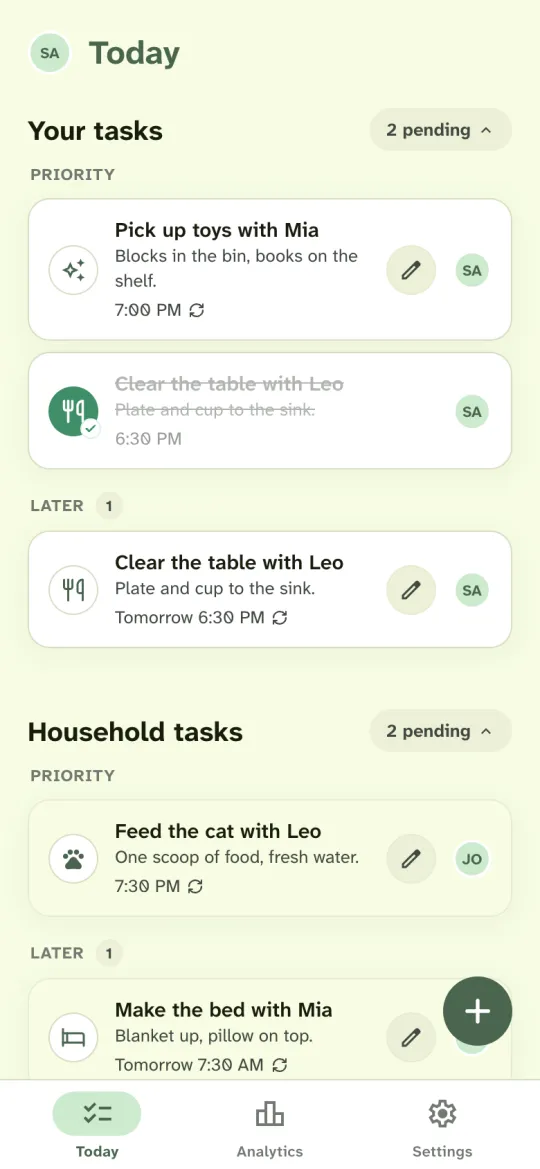
Plan your first chores in four steps.
Pick one or two small chores
Choose a chore your child already sees you do, such as picking up toys, making the bed or clearing the table. One or two chores are enough for the first week.
Add each chore to your own Today
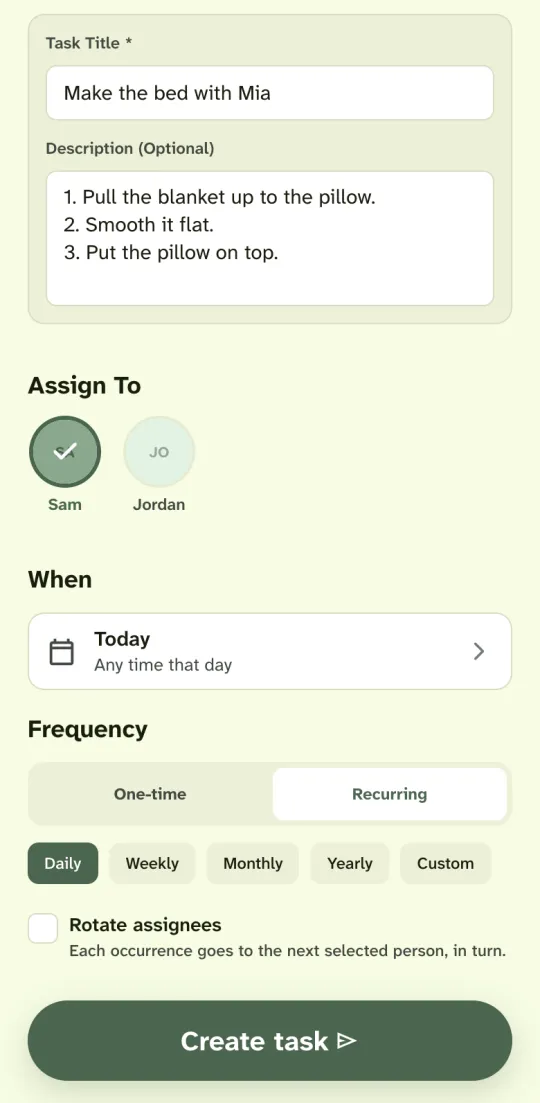
Tap the plus button on Today and choose Custom task. Type a title that names your child, such as Make the bed with Mia, and assign the chore to yourself.
Write the steps in the description
Break the chore into two or three short steps, such as: pull the blanket up, smooth it flat, put the pillow on top. Today shows the description under the chore, so you can read the steps together.
Do it together and mark it done
Do the chore with your child at the time you set. When you finish, tap the chore on Today together. Your partner sees it marked done on their Today.
A first week of chores with your child.
The table shows one way to plan a first week for two children and two parents. Each chore stays with an adult, who does it with the child. Change the names, chores and times to suit your home.
| Chore | Steps to show | When | Adult |
|---|---|---|---|
| Make the bed with Mia | Pull the blanket up, put the pillow on top | Every morning | Jordan |
| Pick up toys with Mia | Blocks in the bin, books on the shelf | Every evening | Sam |
| Clear the table with Leo | Plate and cup to the sink | After dinner | Sam |
| Feed the cat with Leo | One scoop of food, fresh water | Every evening | Jordan |
Start with chores your child can see the end of
A good first chore has a clear finish: the toys are in the bin, the plate is in the sink, the bowl is full. Your child can see that the job is done, and you can mark it done together right away.
Show it, do it together, then let your child lead
In the first days, do the chore while your child watches and helps. Then do it side by side. When your child knows the steps, let them lead while you stay close. Change the description when the steps change.
Keep the same time each day
A chore at the same time each day is easier to remember, for example the toys before the bath. Set the chore to repeat daily, and it comes back on Today each day at that time.
Talk about what your child did
When you mark a chore done, say what your child did: the books are on the shelf, the cat has fresh water. Keep the list short, so you can finish each chore together.
When both parents help
Invite your partner from Settings. Give each chore to the adult who is home at that time, or assign it to both of you. Turn on Rotate assignees, and the chore passes between the two of you each day. Each of you sees your own chores at the top of Today and the other’s chores below.
When a day does not go to plan
Some days the toys stay out. A daily chore that is not done stays on Today as an open chore. Mark it done when you finish it, or cancel it, and the next one shows under Later.
What Housli does not do
Housli is a chore app for the adults in a household. It has no child accounts, points, rewards or parental controls, and it does not suggest chores by age. The plan stays in a parent’s account, and you decide which chores fit your child.
Write the steps in the description.
Choose Custom task to type your own title, such as Make the bed with Mia. Write each step on its own line in the description. Today shows the description under the chore, so the steps are in front of you when you start.
To repeat the chore every day, choose Recurring and Daily. Housli adds it to Today each day. Read how recurring chores and rotation work.
Assign the chore to yourself, to your partner or to both of you. Your child does not need an account, and the plan stays with you.
Questions
Does my child need a Housli account?
No. You keep the plan in your own account and assign each chore to yourself or another adult in the household. Housli has no child accounts.
Is Housli free for this?
Yes. Chores that repeat every day are included, as are rotation, shopping lists, money requests, Analytics, notifications and calendar sync.
Can my child earn points or rewards in Housli?
No. Housli has no points, rewards or prizes. If you use a reward at home, keep it outside the app.
Which chores can I teach first?
Pick a chore with a clear finish that your child already sees you do, such as picking up toys, making the bed, clearing the table or feeding a pet. You decide what fits your child. Housli does not suggest chores by age.
Can both parents see the plan?
Yes. Invite your partner to the household. Each of you sees your own chores and the other’s chores on Today, on iPhone or in any browser.
Will Housli remind me?
Notifications start off. You can turn on a morning or evening summary of your tasks in Settings. Housli doesn’t send an alert for each overdue chore.

Plan the first chore you will do together.
Add one small chore to your Today, do it with your child tonight and mark it done together.
Download for iPhone or sign in through your browser.