
Recurring chores and rotation
Recurring chores and chore rotation for your household.
Housli is a chore app where a recurring chore repeats daily, weekly, monthly, yearly or on a custom interval. Chore rotation gives each occurrence to the next person you selected, in turn. Each occurrence shows on Today on its day, on iPhone or in any browser.

Housli is free for the whole household.
By the Housli team · Updated
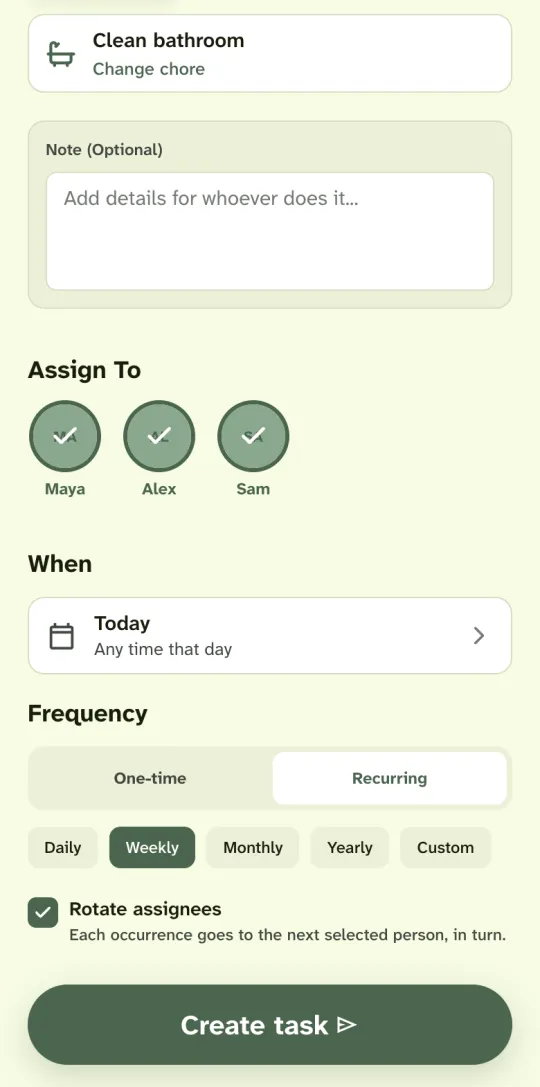
Set up a recurring chore with rotation.
Pick the chore
Tap the plus button on Today and pick a chore, such as Clean bathroom, or type your own.
Select who shares it
Select each person who takes a turn. For one person, the chore goes to them every time.
Choose Recurring and a frequency
Pick Daily, Weekly, Monthly, Yearly or Custom. Set the first date and, if it matters, the time.
Turn on Rotate assignees
Each occurrence goes to the next selected person, in turn. Leave it off to give every occurrence to everyone you selected.
Schedules you can set.
| Frequency | Example | When it repeats |
|---|---|---|
| Daily | Feed the pets | Every day at the same time |
| Weekly | Take out the trash | On the weekday of the first date |
| Monthly | Pay the rent | On the same day each month. A chore set for the 31st falls on the last day of a shorter month. |
| Yearly | Clean the gutters | On the same date each year |
| Custom | Change the sheets | Every 1 to 365 days or every 1 to 52 weeks |
How chore rotation picks the next person
Each occurrence goes to the next person you selected. After the last person, the turn goes back to the first. The table shows a weekly bathroom rotation for three people.
| Occurrence | Date | Who |
|---|---|---|
| 1 | Fri, Oct 9 | Maya |
| 2 | Fri, Oct 16 | Alex |
| 3 | Fri, Oct 23 | Sam |
| 4 | Fri, Oct 30 | Maya |
Leave Rotate assignees off to give every occurrence to everyone you selected.
Which chores to set as recurring
Set a chore as recurring when it comes back on a schedule: the trash every week, the sheets every two weeks, the rent every month. Keep one-off jobs, such as fixing a shelf, as one-time tasks.
When a recurring chore is late
If nobody marks a recurring chore done on its day, it stays on Today as an open chore until someone marks it done or cancels it. After that, the next occurrence shows under Later.
Change the schedule or stop a chore
To change the schedule, open an occurrence and change its date or time. The chore then repeats from the new date. To stop a chore, delete the series from the editor. Chores already done stay in your history and in Analytics.
Recurring chores follow your household’s time zone. A chore set for 8 AM stays at 8 AM for everyone in the household, also when someone travels.
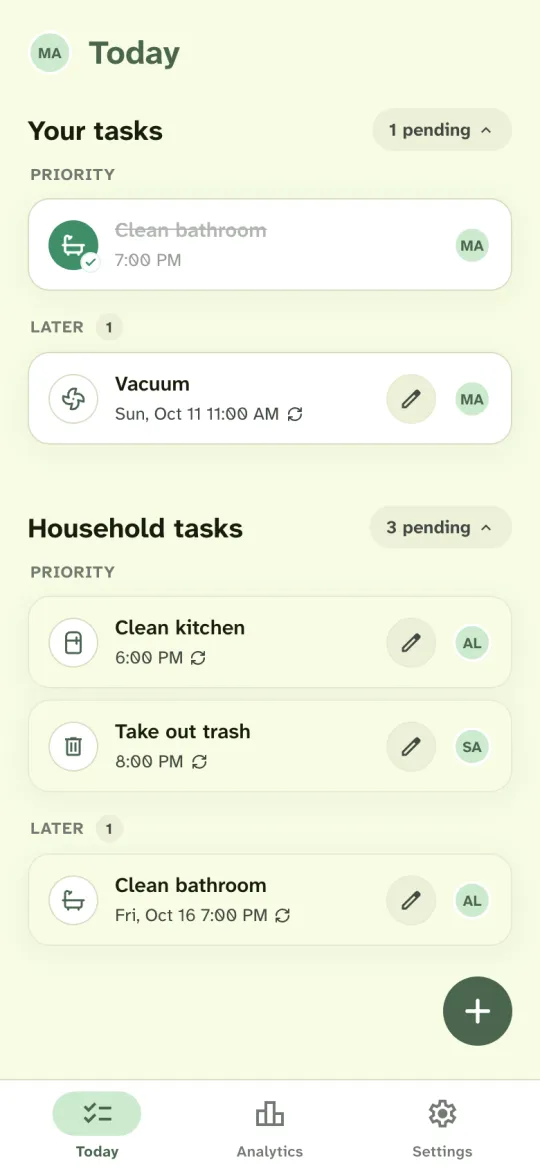
See whose turn is next.
Today shows the current occurrence of each recurring chore with a repeat icon. When the person whose turn it is marks it done, the next occurrence shows under Later with the next person’s initials and date.
To change who does one occurrence, or its title or note, edit it and choose Only today. Choose From now on to change every later occurrence. A new date or time moves the whole schedule. Anyone in the household can mark a chore done, whoever’s turn it is.
Recurring chores work for couples who alternate chores and for roommates who rotate the shared areas.
Questions
Do recurring chores cost extra?
No. Recurring chores and rotation are included, as are the shopping list, money requests, Analytics, notifications and calendar sync. A household can have up to 10 active members.
How do I stop a recurring chore?
Open an occurrence and delete the series from the editor. Chores already done stay in your history and in Analytics.
Can I rotate a shopping list?
Yes. Recurring shopping lists can rotate between the people you select, the same as chores.
Can a chore repeat every other week?
Yes. Choose Custom and set it to every 2 weeks. The chore repeats every second week from its first date.
What is chore rotation?
Chore rotation means a shared chore passes from one person to the next each time it repeats. In Housli, you turn it on with Rotate assignees when you set up a recurring chore.
Can I change who does one occurrence?
Yes. Edit the occurrence, change the people and choose Only today. Choose From now on to change the chore for every later day.
Can several people share every occurrence?
Yes. Select several people and leave Rotate assignees off. Every occurrence goes to all of them, and any of them can mark it done.

Set up the chore that comes back every week.
Pick the chore, the people who share it and how often it repeats. Housli shows whose turn it is on Today.
Download for iPhone or sign in through your browser.