
Chore app for roommates
A chore app for roommates to share the bathroom, kitchen and trash.
Housli is a chore app for roommates. Each shared chore gets a turn order, and every time it comes back, it goes to the next roommate. Everyone sees whose turn it is on Today, on iPhone or in any browser. A household can have up to 10 active members.

Housli is free for the whole household.
By the Housli team · Updated
Set up a rotation for your place.
Create the household and invite your roommates
One person sets up the household and sends each roommate a link. Each roommate signs in with their own account.
Add the shared chores
Start with the chores that cause arguments: clean the bathroom, clean the kitchen, take out the trash, vacuum the living room.
Set how often each chore repeats
Pick the first date and Weekly to repeat on that weekday, or a custom interval such as every 10 days.
Turn on Rotate assignees
Select the roommates who share the chore. Each occurrence goes to the next selected person, in turn.
A roommate chore chart that rotates each week.
A chore chart on the fridge goes out of date in a week, because someone has to move the names. In Housli, the turn moves to the next roommate each time a chore repeats. The table shows three weeks of a weekly rotation for three roommates.
| Week | Bathroom | Kitchen | Trash |
|---|---|---|---|
| Week 1 | Maya | Alex | Sam |
| Week 2 | Alex | Sam | Maya |
| Week 3 | Sam | Maya | Alex |
Each roommate has one shared area each week, and every area comes back to the same person every third week. With four roommates, add a fourth area, such as the living room.
Agree on what each chore includes
Before you start, agree on what each chore means. For example, the bathroom means the sink, the toilet, the shower and the floor. Put that list in the chore’s note, so the roommate whose turn it is can read it.
Which chores to rotate
Rotate the chores that everyone shares, such as the bathroom, the kitchen and the trash. Keep personal chores, such as your own laundry, out of the rotation. A chore that only one person cares about can stay with that person every week.
Set up the household for a shared place
One roommate creates the household and sends each roommate an invite link. Each person signs in with their own account, so every roommate sees their own chores at the top of Today. When someone new moves in, send them an invite link from Settings.
When a roommate is away
If a roommate is away for a week, open their chore on Today, change the person and choose Only today. The rotation keeps its order for the next weeks.
Shared supplies
Most shared homes also run out of dish soap, toilet paper and cleaning spray. Anyone can add these to a Shopping List on Today, and one person buys them. Read how the shared grocery list works.
Each roommate opens Today and sees their turn.
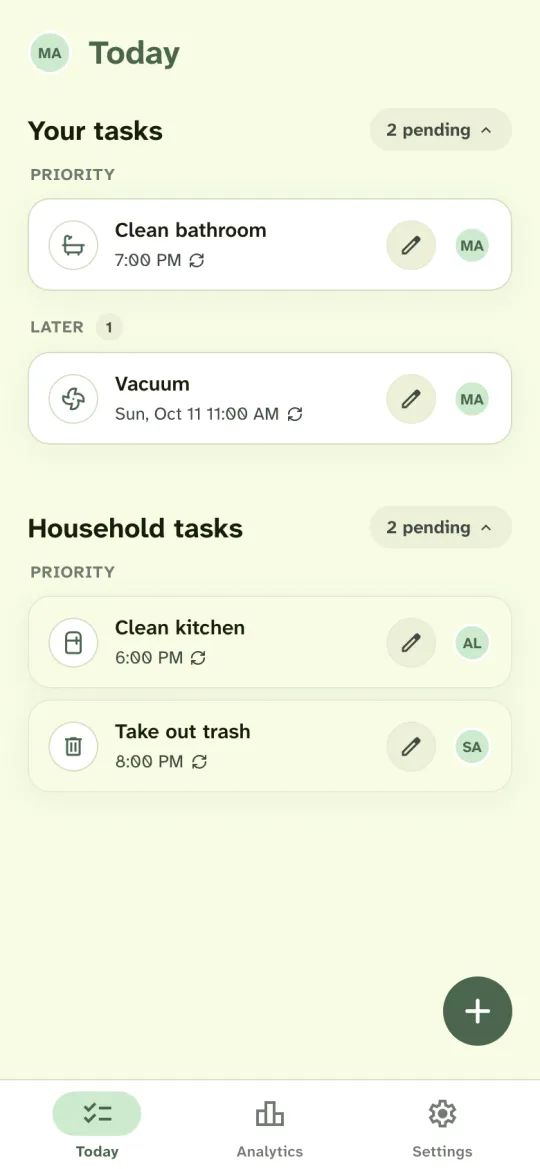
Your chores show at the top of Today. The rest of the household’s chores show below with each person’s initials, so you can see who has the kitchen tonight without asking.
When Maya marks the bathroom done, next week’s bathroom shows under Later with Alex’s initials. See the before and after screens on the recurring chores and rotation page.
Housli also has a shared shopping list that anyone can add to, and money requests for shared bills. If you paid the internet bill, ask each roommate for their share and mark each request paid. The money moves through your usual bank or payment app.
Questions
How many roommates can share a household?
Up to 10 active members. Each roommate joins from an invite link and signs in with their own account.
What if a roommate is away for a week?
Open their chore on Today, change the person and choose Only today. The rotation keeps its order for the next weeks.
Can a roommate use Housli without an iPhone?
Yes. Housli works in any browser, and the iPhone app uses the same household. Each roommate picks what suits them.
Will Housli send my roommates reminders?
Notifications start off. Each roommate can turn on a morning or evening summary and alerts for new assignments in Settings. Housli doesn’t send an alert for each overdue chore.
How does chore rotation work for roommates?
Select the roommates who share a chore and turn on Rotate assignees. Each occurrence goes to the next selected person, in turn, and after the last person the turn goes back to the first.
Can roommates track shared bills too?
Yes. A roommate who paid a bill can send each roommate a money request for their share. The money moves through your usual bank or payment app.

Set up the rotation before the next bathroom argument.
Create the household, invite your roommates and give the shared chores a turn order.
Download for iPhone or sign in through your browser.